

“Passing this to the next shift” sounds tidy until you’re the person on the next shift. You open a long chat, see that somebody has already asked for a screenshot, and still can’t tell whether the customer is waiting for a fix or just a call back.
A useful customer support handoff lets the next person send a sensible reply without asking the customer to start over. It needs two pieces of writing. One is an internal note with enough detail to continue the work. The other is a short message telling the customer who will follow up and when.
A five-line note you can paste into a conversation
| Field | What to write |
|---|---|
| Customer’s goal | The outcome they need, in their words where possible |
| What we know | The symptom, what was tried, and what happened |
| Still open | The specific question that needs an answer |
| Owner and next action | One person or staffed queue, and the next thing to do |
| Promise to the customer | The channel, time, and time zone for the next update |
In a shared inbox such as Dreamstack Livechat, put the note where the receiving teammate will see it alongside the conversation. If your inbox supports private notes and assignment, use both. A mention can ask someone for advice while the original agent continues to own the reply. An assignment serves a different purpose. Intercom’s guide to conversation assignment
A worked handoff for a delayed export
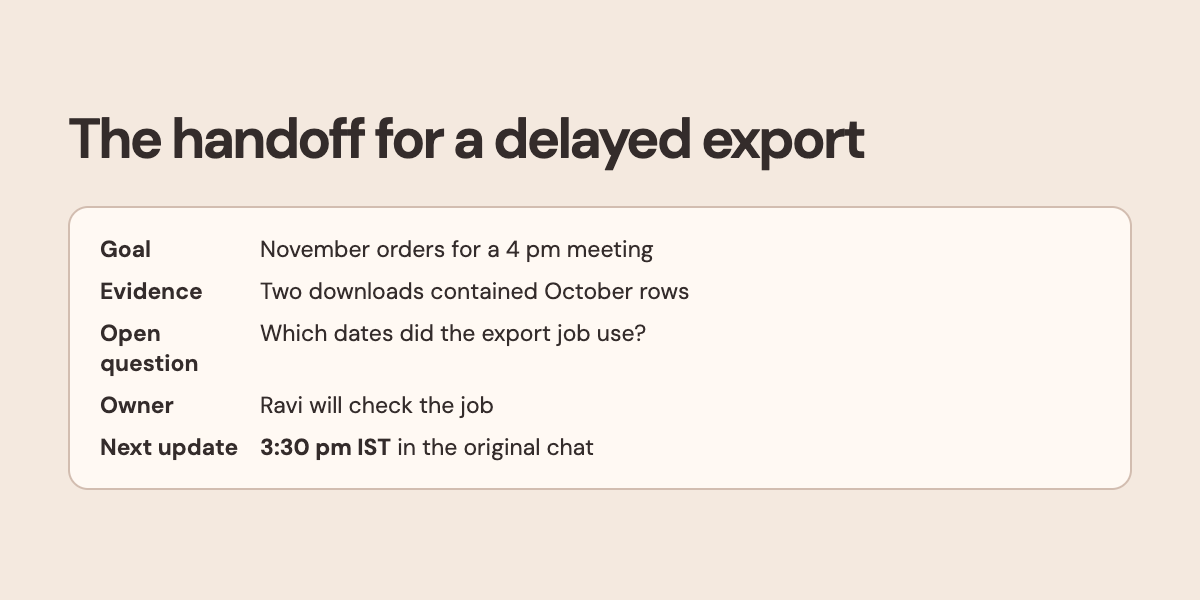
Imagine a customer needs a November orders CSV for a meeting. The export finishes, but the download contains only October orders. They have already tried the date filter twice. Here is the note the evening shift could leave.
Goal. Priya needs the November orders CSV before her 4 pm IST meeting.
What we know. The screen shows November 1–30. Two downloads contained October rows. She supplied a screenshot in this chat.
Still open. Does a fresh export with that date range also contain October rows?
Owner and next action. Ravi has accepted the chat. He’ll check the date range on the export job and reply here.
Promise. Update Priya in this chat by 3:30 pm IST today, even if the cause is still open.
That middle question keeps a guess from quietly turning into a diagnosis. A note that says “timezone bug” might send Ravi straight into date conversion code. The evidence so far also fits a stale download. Knowing exactly what Priya tried saves him from sending her through the same steps a third time.
Priya only needs the part that affects her.
Ravi is picking this up. He has your screenshot and knows the November filter produced October rows twice. He’ll update you in this chat by 3:30 pm IST today.
Only name a person who has accepted the work. If the specialist is still being found, give the customer an update time and keep the current agent responsible for sending it. An update time is something the agent can control. A fix time often depends on someone who hasn’t seen the issue yet.
When the chat moves to email
Confirm the customer’s preferred address and say which address the reply will come from. Keep the original chat linked in the internal case. Bring over the goal, the agreed next action, and the promised update time. A transcript full of private notes or account details has no place in the customer’s inbox.
There’s a simple shift-change check. Give the receiving person a minute with the note, then ask, “What will you do next, and when will the customer hear from you?” If they can answer both, the handoff has done its job. If coverage moves to email, also test whether the next teammate can see sent replies.