
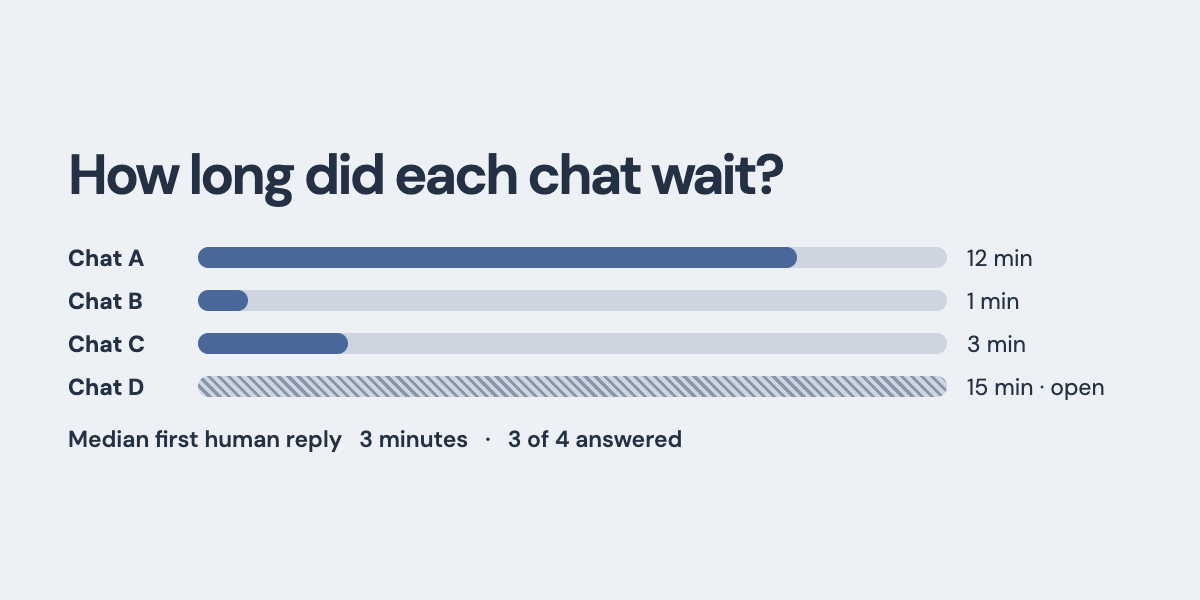

A customer opens a chat at 10:00. An automated greeting appears a second later. At 10:12 a teammate writes, “I can see the order. Let me check the dispatch date.” How long did the customer wait for a person? Twelve minutes. A dashboard can show one second for that same exchange if it counts a bot greeting as the first reply.
To measure first human response time, start at the first incoming customer message and stop at the first public reply from a person on your team. Subtract the two timestamps. That definition answers a particular question about human support. Keep a separate measure for automated answers if those are part of the experience you want to evaluate.
Work through four chats by hand
Suppose these four conversations opened on the same morning, in the same time zone. You run the report at 10:30.
| Chat | First customer message | First public human reply | Wait |
|---|---|---|---|
| A | 10:00 | 10:12 | 12 min |
| B | 10:05 | 10:06 | 1 min |
| C | 10:08 | 10:11 | 3 min |
| D | 10:15 | Still waiting | Open for 15 min |
Three of the four chats have a measured first reply. Their waits, sorted, are 1, 3, and 12 minutes. The median is 3 minutes. The mean is 5 minutes 20 seconds because the three waits add up to 16 minutes. The mean gives the long wait more influence. The median shows what the middle answered customer experienced.
Chat D is easy to lose in an average. Giving it a zero would make the team appear faster every time someone went unanswered. Alongside the timing measure, show 3 of 4 chats answered, 1 still waiting, oldest open wait 15 minutes. If D receives a reply at 10:35, its completed wait becomes 20 minutes.
Decide which events start and stop the clock
Use conversations opened during the reporting period as your starting group. Store the report cutoff too, especially when comparing this morning with yesterday. This morning’s customers have had less time to receive a reply.
For each conversation, take the earliest incoming customer message. Then find the earliest public human reply at or after it. An assignment, private note, or “we’ve received your message” automation leaves the clock running. A customer who adds “one more thing” before the first reply keeps their original start time. Count the conversation once. If you also need to know how quickly a reopened chat gets attention, track that later wait separately.
Check how your inbox defines its own metric before comparing numbers. Zendesk, for example, describes first reply time in relation to ticket creation and the first public agent response. An imported ticket can have a creation time that differs from the customer’s original message. Zendesk’s explanation of ticket reply time
Choose a clock that fits the promise
Suppose the team works Monday to Friday, 9 am to 6 pm. A customer writes on Friday at 5:55 pm and gets a reply on Monday at 9:10 am. In a week with no holiday or clock change, the customer experiences 63 hours 15 minutes of elapsed time. The team uses 15 minutes of staffed time, five on Friday and ten on Monday.
Use elapsed time to understand the customer’s experience. Use business hours to evaluate a promise made in business hours. Label the schedule and time zone beside the number. For teams serving different regions, use the support calendar promised to the customer. The location of whoever happened to pick up the chat is a poor substitute.
A practical weekly review is to read the longest-waiting chat next to a typical one. Did the first arrive outside coverage? Was someone researching an answer while the customer heard nothing? Did an assignment sit unclaimed? Each calls for a different fix. When the delay is between teammates, a clear support handoff gives the next person a specific action to take.