

A service can run comfortably all week and run out of PostgreSQL connections halfway through an ordinary release. The old processes are still finishing requests while their replacements start accepting traffic. Both sets can open database connections. That makes deployment overlap an easy place to underestimate demand.
For a Node.js service using pg.Pool and connecting directly to PostgreSQL, count how many connections the service may use and how many processes can be alive at its busiest moment. Dividing the first by the second gives you an upper bound for each pool. You can run below it.
A worked budget for a rolling deployment
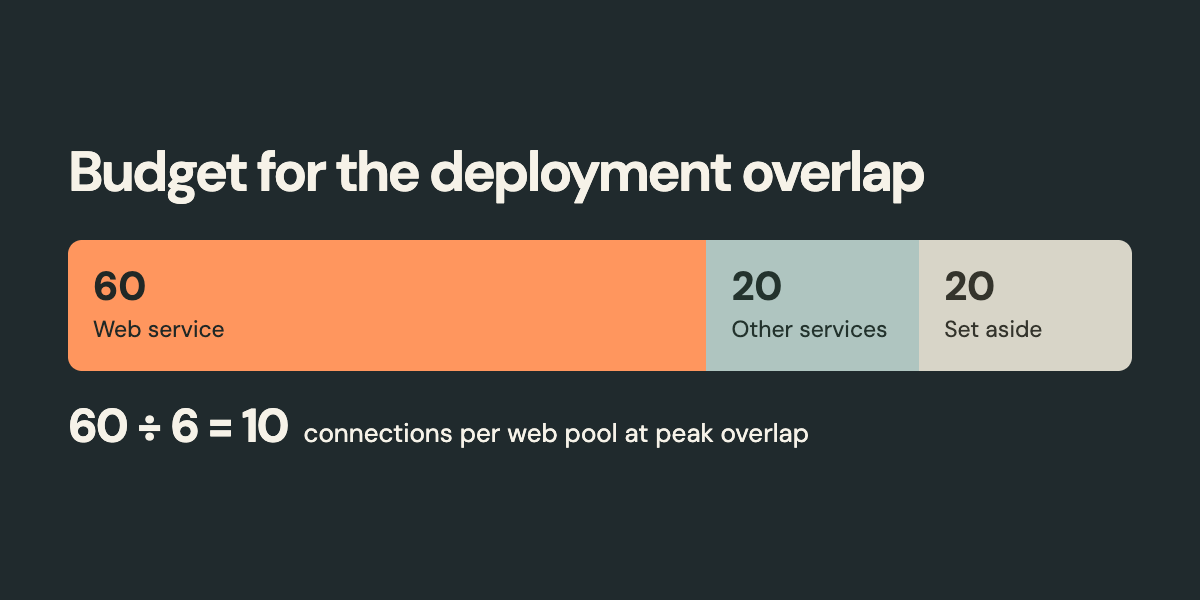
Suppose your database allows 100 connections. You set aside 20 for reserved slots, administration, and maintenance. Other services, including background workers and reporting, have a combined budget of 20. That leaves 60 for the web service.
| Where the connections go | Budget |
|---|---|
| Reserved slots, administration, and maintenance | 20 |
| Workers, reporting, and other services | 20 |
| Web service across all its processes | 60 |
Imagine four web replicas, each running one Node.js process with one pool. During deployment, two more replicas can start before the old ones stop. 60 connections ÷ 6 simultaneous pools = 10 per pool. A cap of 15 would fit on an ordinary afternoon. During the rollout those same six pools could ask for 90 connections, thirty beyond the service’s budget.
If you run web services and workers on Dreamstack Cloud, include both when you draw up the budget. Use your deployment’s actual overlap and autoscaling limit. If each replica runs two independent Node.js processes, the same rollout could create twelve pools. Your per-pool ceiling would fall to five. A pool opens clients as demand arrives, so its cap measures potential demand, even when the dashboard currently looks quiet. node-postgres pool sizing guide
Configure the pool where the process starts
Install pg and put this in an ES module such as db.mjs. Import the exported pool wherever that process needs to query PostgreSQL. Creating a new pool inside a request handler makes your process count useless for budgeting.
import { Pool } from 'pg';

export const pool = new Pool({
  connectionString: process.env.DATABASE_URL,
  application_name: 'orders-web',
  max: 10,
  connectionTimeoutMillis: 2000,
  idleTimeoutMillis: 30000,
});

pool.on('error', (error) => {
  console.error('Idle PostgreSQL client error', error.message);
});
The two-second connection timeout is an example. Choose one that leaves room in the request deadline for the query itself. For a standalone statement, pool.query() handles checkout and release. For a transaction, check out one client, use that client throughout the transaction, and release it in a finally block. A forgotten checkout can look remarkably like a pool that is too small. node-postgres pool API
Find out what is waiting
On the application side, record pool.waitingCount, pool.idleCount, and how long a checkout takes. On the database side, inspect what the application’s connections are doing while the queue is growing.
SELECT application_name, state, count(*) AS connections
FROM pg_stat_activity
WHERE datname = current_database()
  AND backend_type = 'client backend'
GROUP BY application_name, state
ORDER BY application_name, state;
If checkout waits climb during a rollout, compare the process count with the six pools in your calculation. If sessions sit idle in transaction, look for code that opens a transaction and then waits on something else. If the database is busy and queries have slowed, adding more connections may simply put more work in the same queue. PostgreSQL activity statistics
A useful release test is to run the same traffic through one rollout and watch both sides at once. A suitable cap leaves room for administration, keeps checkout waits within your request budget, and still holds when the old and new versions briefly share the database. If you introduce a connection proxy such as PgBouncer, revisit the calculation separately for application-to-proxy clients and proxy-to-database connections.